What is Veck io?
Veck io (also written Veck.io or Veckio) is a free multiplayer first-person shooter that you play in a web browser. It comes from Legion Platforms and launched in browsers in late 2025. In Veck io you drop into short matches, grab a weapon and try to out-aim other players. There is no install for the web version and no account needed to start, which makes Veck io one of the quickest ways to get into an online FPS match.
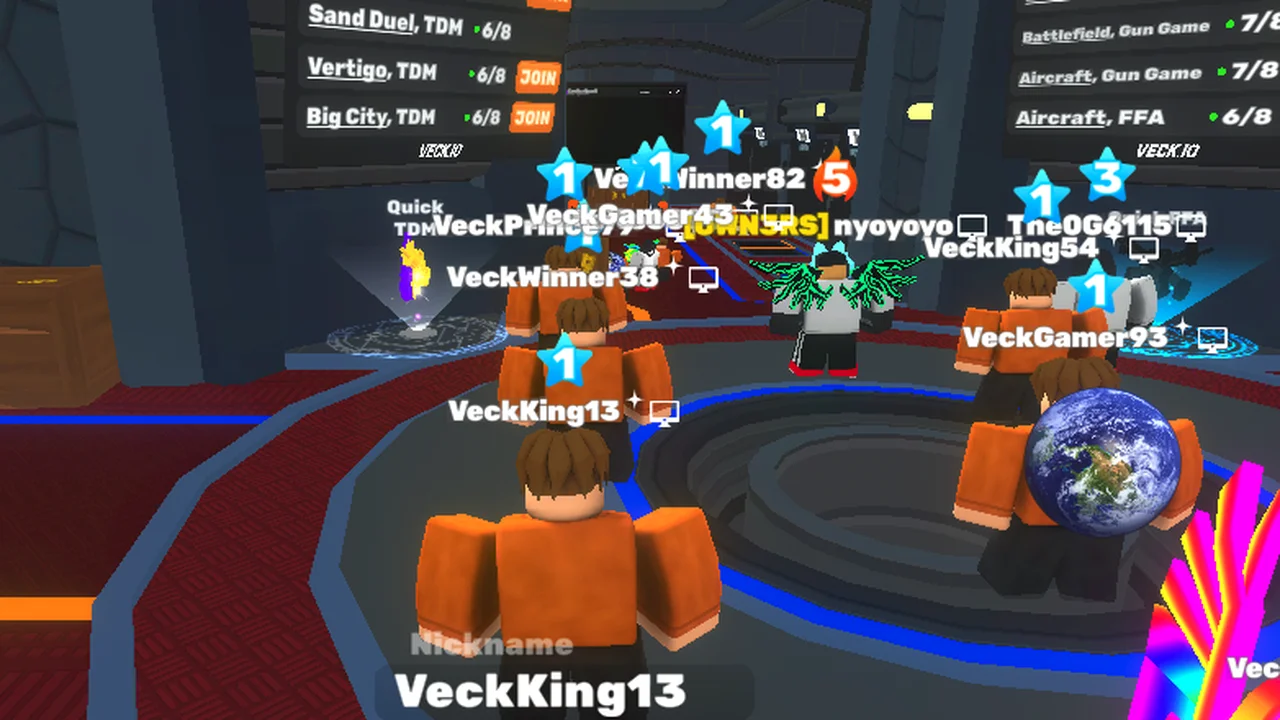
The Veck io lobby is a small hub where other players walk around. From there one orange Play button sends you into a quick unranked match, and the menu bar along the bottom holds everything else: Tasks, Social, Loot, Guns, Pass, Premium, Shop and Settings.
Veck io is also listed on game portals such as CrazyGames. The version on this page is loaded straight from the official site, veck.io, so you get the same game and the same servers. If you came looking for how it differs from Roblox Rivals, see our Veck io vs Roblox Rivals comparison.
How to play Veck io
- Press Play Veck.io above. The game loads in the same window.
- Type a nickname in the box under your character, or keep the one you are given.
- Press the orange Play button to join a match, or press Join next to one of the live rooms listed on the lobby boards.
- Click inside the game so the browser locks your mouse, then move, aim and shoot.
- Press Esc to free your cursor when you want to leave or change settings.
Veck io controls
These are the default keyboard and mouse bindings, checked in the game's Settings → Keybinds screen on November 20, 2026:
| Action | Default key |
|---|---|
| Move | W A S D (or the arrow keys) |
| Look around | Mouse |
| Shoot | Left mouse button |
| Aim | Right mouse button or E |
| Jump | Space |
| Crouch | C or Left Shift |
| Reload | R |
| Pick a weapon slot | 1, 2, 3 … |
| Switch weapons | M |
| Inspect weapon | V |
| Leaderboard | Tab |
| Chat | Enter |
| Release the mouse | Esc |
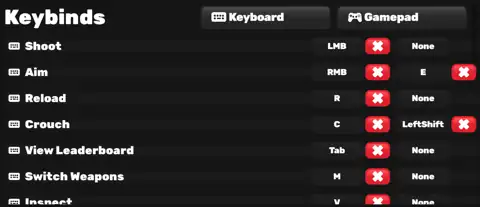
Every key can be changed in the same Keybinds tab, and there is a separate Gamepad tab. The General tab holds mouse sensitivity, mouse aim sensitivity, field of view, graphics preset and server region, so set those before your first Veck io match. Full list, gamepad buttons and settings tips: Veck io controls.
Veck io game modes
The lobby boards list rooms that are live right now, each tagged with a map and a mode. The Veck io modes you will meet most in public rooms are:
- Team Deathmatch (TDM) – two teams race to the most eliminations.
- Free For All (FFA) – everyone for themselves; the best fragger wins.
- Gun Game – every elimination swaps your weapon for the next one in the list, so you have to stay sharp with every gun.
- 1v1 – a straight duel against one other player, the cleanest test of aim.
Private games offer even more: 2v2 up to 5v5, Domination, CTF, Kill Confirmed and Rocket Arena. Rooms show how full they are, such as 6/8 or 7/8, so you can pick a busy lobby and get into the action faster. Every mode in one place: Veck io game modes.
Veck io maps
Maps rotate between rooms. On the live lobby boards we have seen Battlefield, Graveyard, Sand Duel, Practice Range, Block Arena, Aircraft, Void Arena, Blueprint, Playground, Big City and Vertigo, and some rooms run Map Voting. Seasonal events can add themed decorations and limited rewards.
Play Veck io with friends
Veck io has private rooms for groups:
- Press Private Game – Play With Friends in the bottom-right corner of the lobby.
- On the right, pick a mode, player count, match length and region, then press Create Game.
- Share the room code with your friends. They open the same panel, type it into Room ID and press Join Game.
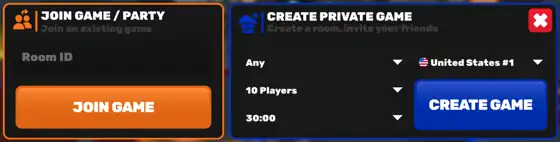
The Invite Friends button at the top of the lobby is another quick way to bring people in. More detail: how to play Veck io with friends.
Weapons, loot and progress
Veck io has a large arsenal covering rifles, shotguns, SMGs, snipers, pistols and melee weapons. The Guns tab shows your weapons, Loot and Tasks hand out rewards for playing, and the Pass tracks seasonal rewards. The two currencies shown at the top of the lobby are spent in the Shop.
Playing Veck io as a guest works fine, but logging in keeps your unlocks and progress if you switch browser or device. Which gun class fits which distance, and how Gun Game walks you through the arsenal: Veck io weapons guide.
Tips to win more Veck io matches
- Lower your sensitivity. Most new players aim too fast. A slower mouse makes tracking targets far easier.
- Keep moving. Strafe and jump while you shoot; standing still makes you an easy target.
- Reload behind cover. Press R after a fight, not in the middle of one.
- Pick a weapon for the distance. Shotguns and SMGs for close corners, rifles and snipers for long sight lines.
- Warm up in FFA or 1v1. Short rounds give you lots of fights and quick feedback on your aim.
- Play with friends in a private room to try weapons without pressure.
The longer version, with a ten-minute warm-up routine and the mistakes that cost the most fights: Veck io tips and tricks.
Before you load Veck io
Veck io needs a fairly recent browser with hardware acceleration turned on. If the game is slow or stuck on loading, close other heavy tabs, refresh the page, lower the graphics preset in Settings or try fullscreen. If your school or work network blocks the game, follow your network rules – we do not offer ways to get around them.
Step-by-step fixes for a page that will not load, a mouse that will not lock or a match that keeps disconnecting are in the Veck io FAQ.
Veckio is an independent fan site. Veck io is made by Legion Platforms and is embedded here from its official site, veck.io. If you prefer, you can always play it there directly.