Veckio / Veck io Game Modes
Veck io Game Modes
Veck io has two ways to play: public rooms you join directly from the lobby boards, and private games you host for friends with a custom mode, player cap, match length and server region. Everything below matches the live lobby boards and the in-game Create Private Game mode menu.
Public rooms and private games
Public rooms are what you enter when you press the orange Play button or click Join next to a room on the lobby boards. Each board listing shows the map name, the active mode and the current player count (for example 6/8 or 7/8), so you can pick an active lobby with an open slot instead of waiting around. Some public rooms also run Map Voting between rounds, and Practice Range rooms appear on the boards when you want a low-pressure warm-up.
Private games open from Private Game – Play With Friends in the bottom-right corner of the lobby and connect players with a shared Room ID. Private rooms unlock fixed team sizes (1v1 to 5v5) plus objective and specialty playlists that do not normally fill the main public boards.
The modes you meet in public rooms
| Mode | What it is | Best for |
|---|---|---|
| Team Deathmatch (TDM) | Two teams compete for the most eliminations | Learning maps with teammates and holding lanes |
| Free For All (FFA) | Every player fights for themselves | Constant gunfights, fast aim warm-ups and solo play |
| Gun Game | Every elimination swaps your weapon to the next one in the progression | Trying the full arsenal without setting up loadouts |
| 1v1 | A head-to-head duel against one opponent | Clean aim practice and settling rivalries |
Modes in the Private Game panel
Open Private Game – Play With Friends and expand the Mode dropdown on the right side to see the full custom playlist:
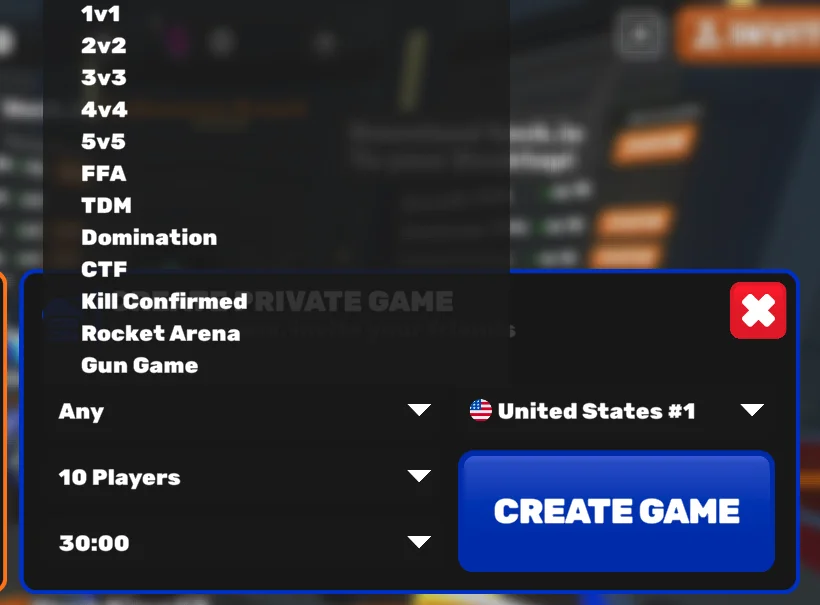
- 1v1, 2v2, 3v3, 4v4, 5v5 – fixed team-size rooms so friend groups can run balanced duels or full squad matches without random fill.
- FFA and TDM – private versions of Free For All and Team Deathmatch with your own player limit and timer.
- Domination – a team zone-control mode where squads fight to capture and hold map points rather than only chasing raw eliminations.
- CTF (Capture the Flag) – a team objective mode centered on grabbing the opposing flag and returning it safely while guarding your own base.
- Kill Confirmed – an elimination mode where players collect dropped tags after a takedown to confirm points (or recover a teammate's tag to deny the other side).
- Rocket Arena – an explosive arena playlist built around rocket combat, shifting fights away from standard rifle duels toward movement, timing and splash damage.
- Gun Game – private weapon-progression matches where every elimination advances you to the next gun.
- Any – leaves the mode open when you just want a quick private lobby.
Alongside Mode, the panel lets the host configure Players (10 Players by default), Time (30:00 by default) and Region (pick the server closest to most of your group for lower ping). Note that the Private Game setup panel chooses mode, player count, match length and region—not an individual starting map.
How to start a private match
- Press Private Game – Play With Friends in the bottom-right corner of the lobby.
- On the right, choose Mode, Players, Time and Region.
- Press Create Game and copy the room code for your group.
- Friends open the same panel, enter the code under Room ID and press Join Game.
Full walkthrough with troubleshooting tips: how to play Veck io with friends.
Which mode should you play first?
- FFA — non-stop fights per minute and no team pressure while you dial in mouse sensitivity.
- Gun Game — cycles you through shotguns, SMGs, rifles and snipers automatically so you discover what fits your aim.
- TDM — adds team positioning, crossfire and cover play.
- 1v1 — the purest test of crosshair placement and movement.
Once you know the core movement and keybinds on the controls page, squad up in private Domination, CTF, Kill Confirmed or Rocket Arena rooms to mix up the pace.
Maps
Maps rotate across rooms and Map Voting lobbies. On the live lobby boards we have seen Battlefield, Graveyard, Sand Duel, Practice Range, Block Arena, Aircraft, Void Arena, Blueprint, Playground, Big City and Vertigo. For choosing the right gun on tight versus open maps, check the Veck io weapons guide, and for a 10-minute warm-up routine see the Veck io tips page.
Play Veck io online and pick a mode from the lobby boards.
Veck io game modes: common questions
What game modes does Veck io have?
TDM, FFA, Gun Game and 1v1 are the modes you meet in public rooms. The Private Game panel lists 1v1 up to 5v5, FFA, TDM, Domination, CTF, Kill Confirmed, Rocket Arena, Gun Game and an Any option.
What is the best mode for a beginner?
Gun Game or FFA. Gun Game moves you through the weapon list as you score, so you meet the arsenal quickly; FFA gives you lots of fights in a short time.
Which mode is best for playing alone?
FFA and the public TDM rooms. You can drop in from the lobby boards without a group.
How do I choose a mode in a private game?
Press Private Game in the bottom-right corner of the lobby, choose the mode, player count, match length and region, then press Create Game and share the room code.
How do I know which mode a public room is?
Look at the lobby boards: every room shows its map, its mode and how full it is, for example 6/8. Pick a room with the mode you want and a free spot.